
KUMQUAT API (2.0.0)
Download OpenAPI specification:Download
欢迎使用KUMQUAT API, KUMQUAT覆盖了全球220多个国家和550个运营商的全球运营商。
KUMQUAT API 是一个RESTful API,根据JSON API规范格式化请求和响应,并且提供以下服务:
- 基础信息服务
- 交易服务
- 查询服务
- 账户服务
- 通知服务
- 正式环境调用前请在平台上配置公网的ip地址。
- 所有接口格式基于 HTTP 协议方式进行调用,以 Web 服务的方式进行相互之间的通信, 要求 HTTP 的版本为 1.1 以上,所有接口支持GET / POST 方法
- 所有接口都需要有签名摘要参数sign,进行参数校验。详细请见认证。
- 所有接口使用的字符集为:
UTF-8。 - 有关时间参数以北京时间(UTC+8)为准。
- 网络异常订单,请登录自助平台确认订单状态,请勿直接以失败处理。
- 充值逻辑中会有少量订单会先成功后失败,请注意对回调进行合理校验和判断。
- ISO 3166-1 标准
该API的主要功能是提供给客户进行充值(例如:话费、流量等), 在充值过程中, 交易将进行各种各样的状态更改和转换。如下所示:
当事务发生变化的时候, 我们将会通过提供的回调URL将实时发送更新。
我们提供查询接口, 并且可以通过下列两种方式进行查找订单状态: request_no(请求编号) 和 serial_no(系统客户订单唯一标识)。 request_no充当唯一参考, 如果在请求过程中未收到返回信息,可以通过request_no查询是否在系统中存在此订单。
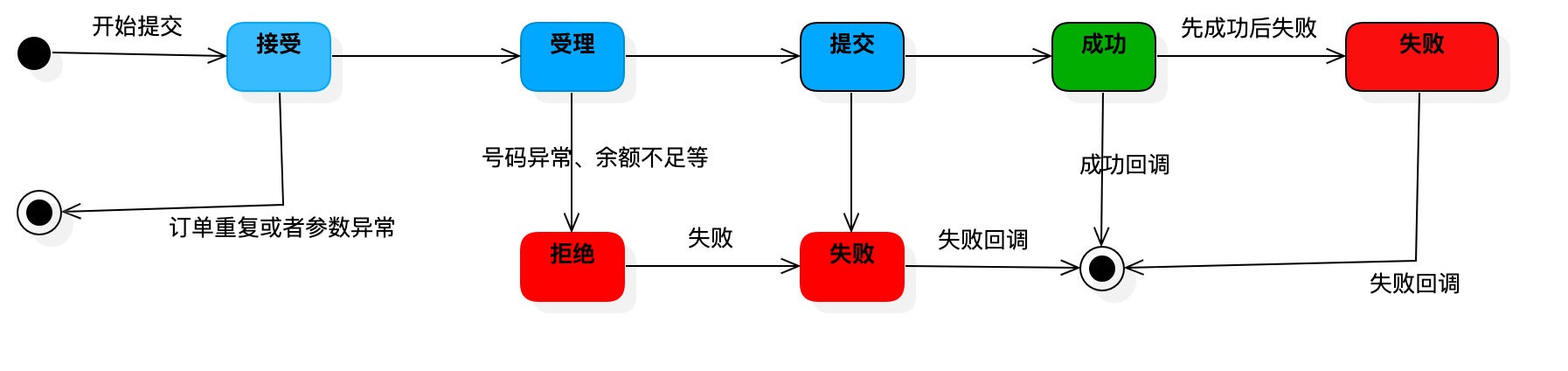
回调地址在后台可以进行配置,并且在下单接口也可以传输回调地址,优先级为接口地址最高,如果下单接口没有传输该参数,那么会以后台配置的回调地址为准,如果都不存在,那么不会进行回调处理。
订单完成时会提供回调通知, 如果当前网络不通畅, 则最多通知5次, 每次阶乘式延迟,如果5次均未成功, 后续不会进行通知。在极少数情况下会发生手动再次回调情况发生, 先成功,后失败的回调情况。并且回调的状态码为 200。
回调url必须是可以访问的公共地址。在测试过程中, 可以使用 ngrok等内网穿透工具进行测试接收回调。
HTTP状态码
KUMQUAT使用标准的HTTP响应代码来指示API请求是否成功。
| http状态码 | 描述 |
|---|---|
200 |
成功 |
400 |
业务错误 |
401 |
未经授权:凭据丢失或无效 |
405 |
请求格式错误 |
503 |
请求过于频繁 |
511 |
签名错误,时间戳校验失败 |
API错误代码
| http状态码 | 业务错误代码 | 描述 |
|---|---|---|
405 |
JU9998 | 请求格式错误 |
400 |
JU9997 | 参数错误 |
511 |
JU9996 | ip错误 |
511 |
JU9995 | 时间戳校验失败 |
511 |
JU9994 | 签名错误 |
400 |
JU9993 | 该订单已经存在 |
400 |
JU9992 | 该产品不存在 |
401 |
JU9991 | 未知身份信息 |
503 |
JU9989 | 请求过于频繁 |
400 |
JU9980 | 没有接口权限 |
400 |
JU9983 | 该产品无效 |
400 |
JU9978 | 无法识别该号码的运营商信息 |
400 |
JU9972 | 号码长度有误 |
订单状态
| 状态 | 描述 |
|---|---|
ACCEPT |
接受订单 |
PROCESSING |
处理中 |
SUBMIT |
提交成功 |
SUCCESS |
充值成功 |
FAIL |
充值失败 |
REJECT |
订单拒绝 |
签名算法
签名生成的通用步骤如下:
第一步,设所有发送或者接收到的数据为集合M,将集合M内所有非空参数值的参数按照参数名ASCII码从小到大排序(字典序),使用URL键值对的格式(即key1=value1&key2=value2…)拼接成字符串stringA。
第二步,在stringA最后拼接上sign_key得到stringSignTemp字符串,并对stringSignTemp进行MD5(32位小写)运算,得到secretkey值signValue。
特别注意以下重要规则:
- 参数名ASCII码从小到大排序(字典序)
- 如果参数的值为空不参与签名
- 参数名区分大小写
- 传送的sign参数不参与签名
秘钥(sign_key)由金橘科技提供。
    传输的参数:
      "partner_no": "test",
      "request_no": "123412434",
      "product_id": 19402,
      "account": "8615180624622",
      "amount": 20,
      "datetime": 20201230134400,
      "spbill_create_ip": "111.111.111.111",
      "callback_url": "https://www.kumquat.com/callback"

    第一步进行拼接字符串:
    A = account=8615180624622&amount=20&callback_url=http://www.kumquat.com/callback&datetime=20201230134400&partner_no=test&product_id=19402&request_no=123412434&spbill_create_ip=111.111.111.111
    sign = MD5(A + sign_key)

    假设密钥为: asfsdfdsfgsrgrssdfseesaef
    sign: a875dead05388c6acdc9a807abd78561
在支持翻页的接口中添加翻页的信息, 会根据信息进行返回数据, 返回的数据在header中进行返回。
输入参数
| Field | Required | Type | Descrption |
|---|---|---|---|
currentPage |
no | Integer | 当前分页, 默认的页码数为1 |
pageSize |
no | Integer | 返回的记录条数, 默认为20条, 最大为100条。 |
输出信息
| Field | Description |
|---|---|
X-Total |
查询的结果总数 |
X-Total-Pages |
总分页数量 |
X-Per-Page |
每页记录数量 |
X-Page |
当前页面 |
X-Next-Page |
下一页, 如果有的话 |
X-Prev-Page |
上一页,如果有的话 |
请求mock数据的时候, 所填写的数据格式必须要要遵循api规范,callback_url的数据可以填写真实能够访问的接口地址。
会正常的对结果进行回调, 回调的校验签名sign_key=123456789
| 账号 | 返回状态 | 回调结果 |
|---|---|---|
| 8615180624622 | 成功收单 | 回调失败(账号金额不足) |
| 6208566322867 | 签名错误, 直接拒绝 | 不回调通知 |
| *(任意号码) | 成功收单 | 回调失败(充值失败) |
| 254771114118 | 成功收单 | 回调成功(充值成功) |
| serial_no | status |
|---|---|
| 0577228903e14f23030c3c5e496033ef | SUCCESS |
| 0557978903e14f23030c3c5e496033ef | REJECT |
国家信息列表
获取所有配置产品的国家信息列表
Request Body schema: application/json
| partner_no | string 客户编号 |
| datetime | stringyyyyMMddHHmmss 请求时间(当前请求时间) |
| sign | string 签名 |
Responses
Request samples
- Payload
{- "partner_no": "string",
- "datetime": "string",
- "sign": "string"
}Response samples
- 200
{- "returnCode": "string",
- "errorCode": "string",
- "returnMsg": "string",
- "result": [
- {
- "name": "string",
- "country_code": "string",
- "iso_code": "string",
- "area_number": "string"
}
]
}查询单个国家信息
根据国际标准iso 3166-1二位标准编号获取国家信息
path Parameters
| countryCode required | string 根据国际标准 |
Request Body schema: application/json
| partner_no | string 客户编号 |
| datetime | stringyyyyMMddHHmmss 请求时间(当前请求时间) |
| sign | string 签名 |
Responses
Request samples
- Payload
{- "partner_no": "string",
- "datetime": "string",
- "sign": "string"
}Response samples
- 200
{- "returnCode": "string",
- "returnMsg": "string",
- "errorCode": "string",
- "result": {
- "name": "string",
- "country_code": "string",
- "iso_code": "string",
- "area_number": "string"
}
}运营商列表信息
获取所有运营商列表信息
Request Body schema: application/json
| partner_no | string 客户编号 |
| datetime | stringyyyyMMddHHmmss 请求时间(当前请求时间) |
| currentPage | integer 当前页面 |
| pageSize | integer 页面大小 |
| sign | string 签名 |
Responses
Request samples
- Payload
{- "partner_no": "string",
- "datetime": "string",
- "currentPage": 0,
- "pageSize": 0,
- "sign": "string"
}Response samples
- 200
{- "returnCode": "string",
- "returnMsg": "string",
- "errorCode": "string",
- "result": [
- {
- "country": {
- "name": "string",
- "country_code": "string"
}, - "name": "string",
- "full_name": "string",
- "id": 0
}
]
}查询单个国家运营商信息
根据国家iso-3166-1编号获取该国家所有运营商信息
path Parameters
| countryCode required | string 根据国际标准 |
Request Body schema: application/json
| partner_no | string 客户编号 |
| datetime | stringyyyyMMddHHmmss 请求时间(当前请求时间) |
| sign | string 签名 |
Responses
Request samples
- Payload
{- "partner_no": "string",
- "datetime": "string",
- "sign": "string"
}Response samples
- 200
{- "returnCode": "string",
- "returnMsg": "string",
- "errorCode": "string",
- "result": [
- {
- "country": {
- "name": "string",
- "country_code": "string"
}, - "name": "string",
- "full_name": "string",
- "id": 0
}
]
}产品列表信息
分页产品查询, 可以根据国家、运营商和类型进行筛选数据
Request Body schema: application/json
| partner_no | string 客户编号 |
| datetime | stringyyyyMMddHHmmss 请求时间(当前请求时间) |
| sign | string 签名 |
| country_code | string 根据国际标准 |
| carrier | string 运营商(可选), 传入 carrier的id信息 |
| type | string 类型(HF(话费简称)/LL(流量简称)) (可选) |
| start | stringyyyy-MM-dd HH:mm:ss 产品更新时间 开始时间范围查找 (可选) |
| end | stringyyyy-MM-dd HH:mm:ss 产品更新时间 结束时间范围查找 (可选) |
| currentPage | integer 当前页面 |
| pageSize | integer 页面大小 |
Responses
Request samples
- Payload
{- "partner_no": "string",
- "datetime": "string",
- "sign": "string",
- "country_code": "string",
- "carrier": "string",
- "type": "string",
- "start": "string",
- "end": "string",
- "currentPage": 0,
- "pageSize": 0
}Response samples
- 200
{- "returnCode": "string",
- "returnMsg": "string",
- "errorCode": "string",
- "result": [
- {
- "id": 0,
- "name": "string",
- "partnerId": 0,
- "price": 0,
- "currency": "string",
- "countryCode": "string",
- "carrier": "string",
- "carrierId": 0,
- "type": "string",
- "valid": true,
- "remark": "string",
- "productCode": "string",
- "updated": "string",
- "info": "string",
- "validity": "string",
- "unitValidity": "string",
- "baseValue": 0,
- "unit": "string",
- "pin": true
}
]
}查询单个产品
根据客户产品id查询产品
path Parameters
| id required | integer <int64> 客户产品id |
Request Body schema: application/json
| partner_no | string 客户编号 |
| datetime | stringyyyyMMddHHmmss 请求时间(当前请求时间) |
| sign | string 签名 |
Responses
Request samples
- Payload
{- "partner_no": "string",
- "datetime": "string",
- "sign": "string"
}Response samples
- 200
{- "returnCode": "string",
- "returnMsg": "string",
- "errorCode": "string",
- "result": {
- "id": 0,
- "name": "string",
- "partnerId": 0,
- "price": 0,
- "currency": "string",
- "countryCode": "string",
- "carrier": "string",
- "carrierId": 0,
- "type": "string",
- "valid": true,
- "remark": "string",
- "productCode": "string",
- "updated": "string",
- "info": "string",
- "validity": "string",
- "unitValidity": "string",
- "baseValue": 0,
- "unit": "string",
- "pin": true
}
}号码信息查询
根据手机号码查询运营商信息
path Parameters
| id required | String 手机号码 |
Request Body schema: application/json
| partner_no | string 客户编号 |
| datetime | stringyyyyMMddHHmmss 请求时间(当前请求时间) |
| sign | string 签名 |
| country_code | string 国家编号 |
Responses
Request samples
- Payload
{- "partner_no": "string",
- "datetime": "string",
- "sign": "string",
- "country_code": "string"
}Response samples
- 200
{- "returnCode": "string",
- "returnMsg": "string",
- "errorCode": "string",
- "result": {
- "country": {
- "name": "string",
- "country_code": "string"
}, - "name": "string",
- "full_name": "string",
- "id": 0
}
}下单接口
客户请求下单接口成功后返回该订单的信息
Request Body schema: application/json
| partner_no | string 客户编号 |
| request_no | string 请求id(需要保证唯一性, 长度不多于32位) |
| product_id | integer <int64> 产品id |
| account | string <^[0-9]{6,15}$> 账号(8-15位), 需要携带国家区号进行提交。否则会提交不成功 |
| datetime | stringyyyyMMddHHmmss 请求时间(当前请求时间) |
| sign | string 签名 |
| callback_url | string 回调地址 |
Responses
Request samples
- Payload
{- "partner_no": "string",
- "request_no": "string",
- "product_id": 0,
- "account": "string",
- "datetime": "string",
- "sign": "string",
- "callback_url": "string"
}Response samples
- 200
{- "returnCode": "SUCCESS",
- "returnMsg": "请求成功",
- "result": {
- "serial_no": "d1f09f77cae54f898fac659ea33eba3f",
- "product_id": 19402,
- "currency": "CNY",
- "price": 1.05,
- "status": "ACCEPT"
}
}自动判定下单(收费接口,请联系销售)
提供充值对应国家的号码和充值面值, 判定成功自动进行下单, 该接口为收费接口
Request Body schema: application/json
| partner_no | string 客户编号 |
| request_no | string 请求id(需要保证唯一性, 长度不多于32位) |
| country_code | string 国家编号 |
| account | string <^[0-9]{6,15}$> 账号(8-15位), 需要携带国家区号进行提交。否则会提交不成功 |
| base_value | number <double> 面值 |
| unit | string 单元 |
| datetime | stringyyyyMMddHHmmss 请求时间(当前请求时间) |
| sign | string 签名 |
| callback_url | string 回调地址 |
Responses
Request samples
- Payload
{- "partner_no": "string",
- "request_no": "string",
- "country_code": "string",
- "account": "string",
- "base_value": 0,
- "unit": "string",
- "datetime": "string",
- "sign": "string",
- "callback_url": "string"
}Response samples
- 201
{- "returnCode": "string",
- "errorCode": "string",
- "returnMsg": "string",
- "result": {
- "serial_no": "string",
- "product_id": "string",
- "currency": "string",
- "price": 0,
- "status": "string"
}
}订单查询
根据订单号进行查询, 可以根据serial_no或request_no进行数据查询。
Request Body schema: application/json
| partner_no | string 客户编号 |
| serial_no | string 平台唯一订单编号 |
| request_no | string 客户下单接口的请求id |
| datetime | stringyyyyMMddHHmmss 请求时间(当前请求时间) |
| sign | string 签名 |
Responses
Request samples
- Payload
{- "partner_no": "string",
- "serial_no": "string",
- "request_no": "string",
- "datetime": "string",
- "sign": "string"
}Response samples
- 200
{- "returnCode": "SUCCESS",
- "returnMsg": "请求成功",
- "result": {
- "product_id": 19401,
- "currency": "BDT",
- "price": 1,
- "status": "FAIL",
- "request_no": "0000000000000000010",
- "serial_no": "7da38795a89924e0a57cf9fb67a4fc2c"
}
}余额查询
余额查询接口, 当 balance>0, 可用余额为 balance + credit. 当 balance < 0, 可用余额为 credit.
Request Body schema: application/json
| partner_no | string 客户编号 |
| datetime | stringyyyyMMddHHmmss 请求时间(当前请求时间) |
| sign | string 签名 |
Responses
Request samples
- Payload
{- "partner_no": "string",
- "datetime": "string",
- "sign": "string"
}Response samples
- 200
{- "returnCode": "SUCCESS",
- "returnMsg": "请求成功",
- "result": {
- "currency": "CNY",
- "balance": 802.345,
- "credit": 200,
- "result": 1,
- "share_balance": 500,
- "share_credit": 200,
- "message": "余额查询成功"
}
}通知回调
回调该订单的最终结果, 收到结果之后需要返回 SUCCESS,如果未收到返回结果, 将会连续进行回调, 每次时间间隔为幂次方。总共返回5次。
Request Body schema: application/json
| result | string 消息 |
| price | string 价格 |
| request_no | string 请求编号 |
| serial_no | string 订单编号 |
| sign | string 签名 |
| status | string 返回的最终状态信息, 成功返回 success , 失败返回 error |
| pin | string 如果是卡密的产品会返回pin码信息 |
Responses
Request samples
- Payload
{- "result": "充值失败",
- "price": "98.0",
- "request_no": "0000000000000000001",
- "serial_no": "7da98795a89940e0a57cf9fb67a4fc2c",
- "sign": "9A5A2EE75BF959EA9A60635E6AFA80DD",
- "status": "error"
}Response samples
- 200
"string"